Phigros++: modding Phigros in three days, with replays a server re-judges
tl;dr
In a little over three days I went from 'is modding Phigros doable?' to Phigros++ (Lua 5.4, an il2cpp bridge and Dobby in a 600 KB library), replays the game can judge again frame for frame, a 275 KB installer that patches the Play Store game on the phone, and a leaderboard whose worker re-judges every uploaded replay and only counts it when all 8 result numbers match.
phigros.tools could read my save, but it couldn’t touch my game. It’s a save analyzer (your ranking score, your Best 27 + 3 Phi, what to grind next) with a chart player on top, which plays every chart in the browser thanks to the codec from my last post. All of that happens after you play: nothing on the site knows what happens during a song.
Here’s how it started in my head:
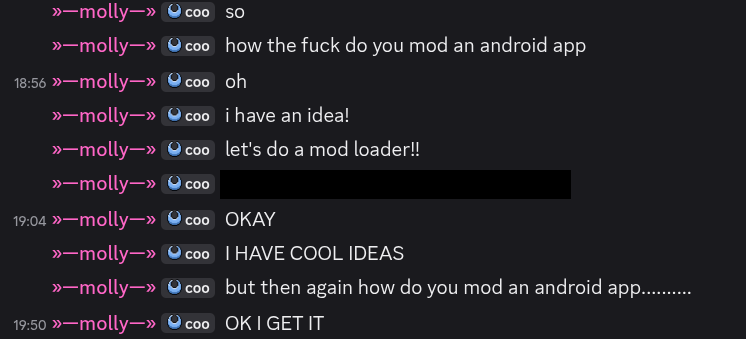
My initial idea was to see what grade I was on track for, right next to the score counter while playing, so I’d know mid-song whether the run was still worth finishing or if I should restart. The last message above is from the moment it first showed up in the game.
Somehow that one small wish grew into a whole platform, built to bring together an existing community around an offline game:
- Phigros++, a Lua mod loader that runs inside the game, with access to every class in it by name,
- replays that record every touch, and let the game judge them again,
- a 275 KB installer that turns the Play Store version of Phigros into Phigros++ on the phone itself,
- a leaderboard on phigros.tools that only ranks a replay after a server has re-judged it and got the exact same result.
The last release of that stretch went out a little over three days after the first message. All of it was tested on one non-rooted Xiaomi tablet. Phigros++ is unofficial and not affiliated with Pigeon Games.
Phigros, Unity and IL2CPP
If you’ve never played it: Phigros is a rhythm game where notes fall onto moving judgment lines, and you tap them as they cross. The codec post explains charts in detail. Here’s Horizon Blue (IN) at 1:30 if you want to see one (be careful the music style might be disturbing for some).
The game is made with Unity. Unity games are written in C#, and on Android they’re usually built with IL2CPP: the C# is translated to C++ and compiled ahead of time to native ARM code. What’s left of C# is a metadata file that lists every class, field and method by name.
From the Play Store, Phigros 4.0.1.2 arrives as four split APKs:
Phigros 4.0.1.2
|-- base.apk                     26.6 MB   Java, manifest,
|                                          global-metadata.dat
|-- split_config.arm64_v8a.apk   29.0 MB   libmain.so,
|                                          libil2cpp.so, ...
|-- split_UnityDataAssetPack     767.6 MB  scenes, textures
`-- split_UnityStreamingAssets   1,969.7 MB  songs, charts
Two native libraries matter here. libil2cpp.so is the whole game, 71,736,936 bytes of compiled C#. libmain.so is a 6,728-byte stub that Unity’s Java code loads first, and that then starts everything else. That tiny stub is where Phigros++ gets in.
The first thing I checked was what libil2cpp.so exports:
$ nm -D libil2cpp.so | grep -c ' T il2cpp_'
241
241 exported il2cpp_* functions. That’s IL2CPP’s runtime API, the one Unity itself uses to look things up, and it’s a full reflection API: find a class by name, list its methods, read a field, call a method. So I didn’t need a dump of the game’s internals or a single hard-coded address to start. Everything could be resolved by name, at runtime, on whatever version of the game is installed.
That became the first house rule, and it never changed: talk to il2cpp by name, never by offset. An offset breaks on the next game update, while a name usually survives it.
The evening prototype
My tablet isn’t rooted, and unlocking the bootloader on a Xiaomi wipes it. So instead of injecting into the game from outside, I put the code inside it: unpack the APK, add a library, sign it again, install it as a replacement. The library was Frida Gadget, which runs JavaScript inside the process and can hook any native function. I backed up my cloud save first.
The repacked game closed the instant it opened. Frida Gadget 17.19.0 crashed in its own constructor with a null pointer read at address 0x38. 17.25.2 worked. I never found out why, and I stopped caring once it ran.
Frida’s listen mode was perfect for prototyping: the JavaScript is pushed over USB and swapped while the game runs, so I could change the HUD without reinstalling anything. The score lives in a ScoreControl object, and through the il2cpp API I could read its fields live: _score, _combo, maxcombo, and the perfect, good, bad and miss counts.
Phigros’ scoring is public knowledge, and simple enough to recompute every frame. With N notes, P perfects, G goods:
score = 900000 * (P + 0.65*G) / N + 100000 * maxCombo / NThe first part is accuracy, the second is combo. To get the grade you’re on pace for, I compute that same formula over the notes judged so far instead of all N, and compare it to the grade bands phigros.tools already uses (Phi at 1,000,000, V at 960,000, S at 920,000, and so on). Halfway through a song with 400 perfects, 10 goods and a full combo, accuracy is (400 + 6.5) / 410, about 99.15%, the pace is 992,317, and the HUD shows a blue V (blue because it’s a full combo).
Then I wanted the timing bar from osu!: a strip at the bottom of the screen where each hit drops a tick, left for early and right for late. I ported osu!‘s constants as they are: at most 50 ticks on screen, each fading in over 100 ms and out over 5 seconds. About an hour later, it worked.
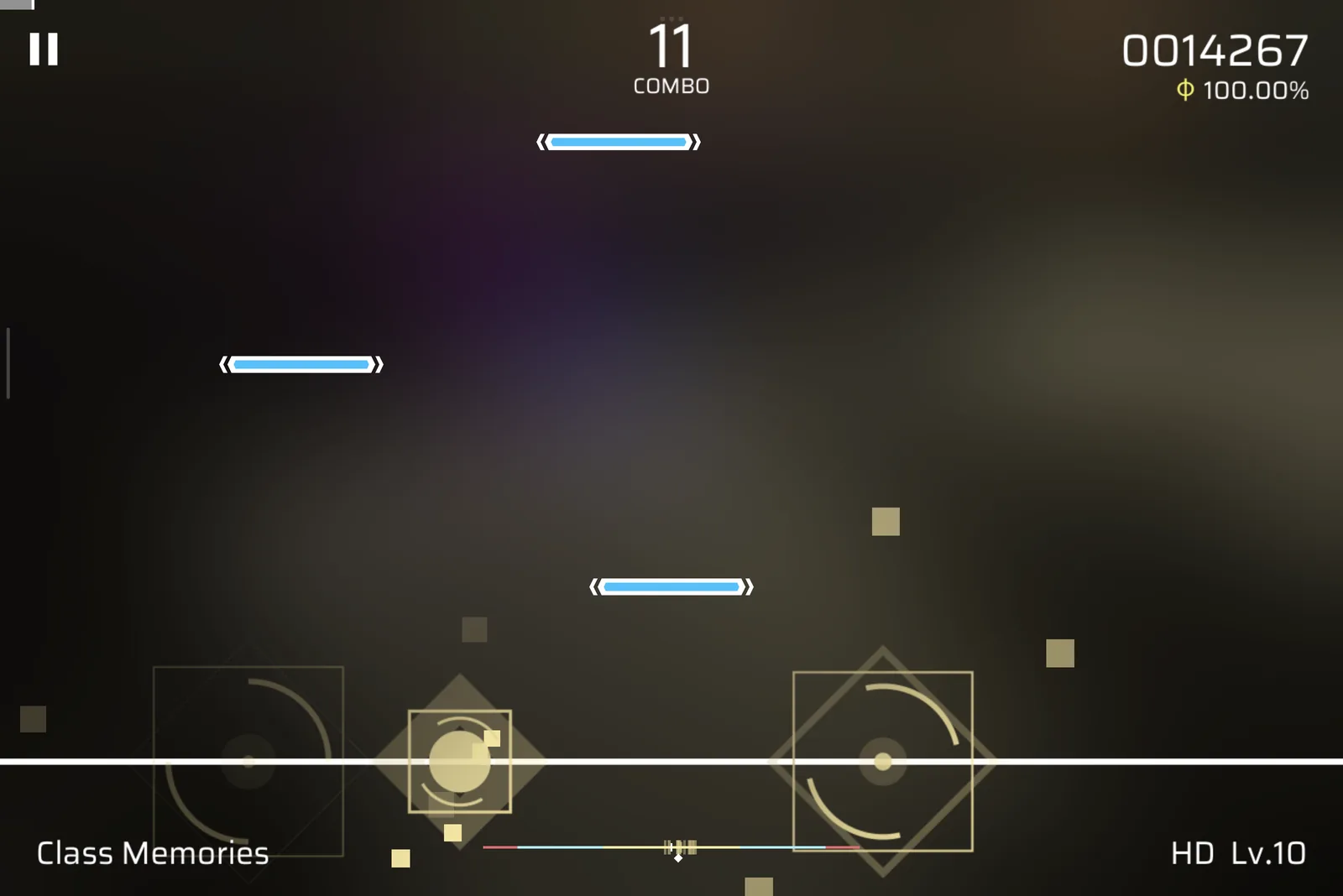
Two bugs from that evening are worth a line. The bar first showed up in the middle of the screen, because the canvas the score sits on is 38x10 units, so I placed it by mirroring the score’s position instead. And for a while every retry cloned the cloned score text, so a stray 0000000 piled up in the corner.
One mistake took longer to notice, and it turned out to be a small finding. The bar’s coloured bands used perfect, good and bad windows of 80, 160 and 180 ms. The game’s own windows are 80, 180 and 220 ms. They’re static fields on JudgeControl (PerfectTimeRange, GoodTimeRange and BadTimeRange), and the judge I ported later is built on those three values and reproduces recorded plays exactly. Today the HUD reads them from the game instead of trusting me.
Phigros++: getting Lua into the game without Frida
Later that evening, I asked myself the obvious next question: could this be a mod loader, in Lua, with every API I could think of? Twenty minutes after that, it had a name: Phigros++.
The first version still ran on Frida. Lua 5.4 and a bridge to IL2CPP went into a native library, libphimod.so (297,936 bytes), and the Frida Gadget, embedded in the APK, ran a small JavaScript loader that did the hooking for it. Frida is heavy, though. The gadget alone was 39,409,456 bytes, and I only used it to intercept functions. So I swapped it for Dobby, a small inline-hooking library, and moved the hooking into the library itself. The first Frida-free build came to 381,064 bytes once libc++ was linked in statically, and a little over an hour later the game logged:
Phigros++ 0.1.0 ready, ticking on CanvasUpdateRegistry.PerformUpdateLua is a good fit for this. It’s small, it’s made to be embedded, and a mod can change without reinstalling the game. I kept C for the parts that have to be native: loading, hooking, and the bridge between Lua and il2cpp.
How it boots
Getting my library into the process takes one change to one file: libmain.so gets one more entry in its list of required libraries (a DT_NEEDED entry, in ELF terms). When Unity’s Java code calls System.loadLibrary("main"), Android’s dynamic linker loads everything libmain.so depends on first, and that now includes libphigrospp.so. The game’s Java code stays untouched. At build time that’s 10 lines of LIEF:
elf = lief.parse(src)
if "libphigrospp.so" not in elf.libraries:
    elf.add_library("libphigrospp.so")
elf.write(dst)
From there, the chain goes:
- The constructor. A C function marked
__attribute__((constructor))runs as soon as the library is loaded, beforelibmain.so’s own code. At that pointlibil2cpp.soisn’t loaded yet, so there’s nothing to hook. - Wait for the game. So I hook
dlopenandandroid_dlopen_ext, the functions that load libraries, and watch forlibil2cpp.soto go by. - Hook
il2cpp_init. When it shows up, I hook the function that starts the IL2CPP runtime. - Start. Once
il2cpp_initreturns, the runtime is ready.start()resolves 55il2cpp_*exports by name and hooks one method that runs on the main thread once per frame:UnityEngine.UI.CanvasUpdateRegistry.PerformUpdate. - Tick. On every frame, that hook loads Lua if it isn’t loaded yet (the core files in order, then the mods), and then fires an
updateevent.
DT_NEEDED in the 6,728-byte libmain.so loads it before Unity's native code starts. It waits for libil2cpp.so, lets il2cpp_init finish, resolves 55 functions by name, then runs Lua on every frame.Step 2 has a catch that cost me the first run, which logged linker entry points not found, Phigros++ is off. Android’s linker picks which namespace a library is loaded into from the caller’s address. If my hook calls the real dlopen, the caller becomes my library, and the game’s libraries end up in the wrong namespace. The fix is to call the linker’s private functions, __loader_dlopen and __loader_android_dlopen_ext, and pass along the real caller (__builtin_return_address(0)).
But dlsym, the usual way to look up a function by name, refuses to hand those private ones to an app. libdl.so itself calls them, though, and when bionic, Android’s C library, loads libdl.so, it writes their real addresses into a table inside it. So Phigros++ walks libdl’s dynamic section with dl_iterate_phdr, finds the relocations for those two names, and reads the addresses already written in its Global Offset Table:
static void *hooked_dlopen(const char *name, int flags) {
  void *handle = loader_dlopen(name, flags,
                               __builtin_return_address(0));
  loaded(name, handle);  // libil2cpp.so? hook il2cpp_init
  return handle;
}
The other dead ends were shorter. Dobby’s master branch didn’t build, so I pinned a commit from March 2023. Before hooking anything in system libraries, I checked that none of them were built with BTI (a CPU feature that faults on jumps to unmarked code, and an inline hook is exactly that). They weren’t. And for an hour I chased a game that “killed itself” 1.7 seconds after start, which turned out to be a stuck Google Play Games sign-in screen sitting over Unity, not my code.
Hooks: 1024 thunks
Lua needs to hook any game method by name, with any signature, and read its arguments. Dobby redirects a function to an address you give it, so I need one address per hooked method that still knows which method it is. That’s 1024 tiny thunks (source), 8 bytes each, generated by the assembler:
phigrospp_thunks:
    .rept THUNKS          // 1024
    mov x16, #id          // which hook this is
    b common
    .set id, id + 1
    .endr
Dobby sends hooked function N to thunk N, and every thunk jumps to the same common routine with its number in x16. On ARM64, a function receives its first arguments in registers, small slots inside the CPU, and the rest on the stack. So common:
- saves
x0-x7(integers and pointers),x8(where a big return value goes) andq0-q7(floats) in a 304-byte stack frame, - calls into C (
phigrospp_enter), which runs the Luabeforehooks, - unless one of them asked to skip the original, copies the caller’s 64 bytes of stack arguments back down and calls the original method,
- calls
phigrospp_leavefor theafterhooks, which may replace the result.
On a skip, the result registers are zeroed and the after hooks never run.
x16 and jumps to common, which saves every argument register in a 304-byte frame (drawn to scale on the right), so Lua can read the arguments before the original runs and replace the result after. A skip never reaches phigrospp_leave: the zeroed result goes straight back.To turn saved registers into Lua values, the C side has to know where each argument went. That’s the ARM64 calling convention (AAPCS64), and IL2CPP’s metadata gives every parameter’s type, so the classifier can tell an integer from a float, from a small struct like Vector3 (three floats, passed in three float registers), from a big struct, which is passed as an address in an ordinary register. x8 has a job of its own: when a method returns a big struct, the caller puts there the address to write it to.
Two rules keep it safe. A hooked target is never unhooked, so a call still running can never jump into freed code: reloading Lua only detaches the Lua side. And a hook that fails 10 times in a row gets disabled.
A hook has three kinds of handler: before, after, and skip, which can replace a method entirely. When a skip handler throws an error, the original is still skipped.
The bridge
On the Lua side, the whole game is a table called CS. CS.UnityEngine.GameObject is a lazy proxy that finds the class by name the first time you touch it. A field, a method and a get_X property all read the same way. Calls go through overload resolution by scoring (please don’t read the code it’s awful): an exact type match scores 3, an assignable one 2, a loose one 1, and when nothing fits, the error lists every overload. Structs become Lua tables, strings convert between UTF-16 and UTF-8.
The garbage collector needed the most care. Each Lua object holding a C# object pins it with a GC handle, since the IL2CPP collector doesn’t scan Lua’s heap and would otherwise free objects Lua still uses. Unity’s “fake null” (a destroyed object that isn’t nil yet) goes through Object.op_Implicit, like in C#. Unity objects that a mod creates are destroyed when Lua reloads, so mods never have to clean up after themselves.
A background thread hashes the names, sizes and modification times of the Lua files every second, and reloads when they change. Editing a mod on the tablet updates the running game a second later.
Here’s what a mod looks like, the 17-line tutorial mod, trimmed. A fresh install starts in the game’s tutorial with the back and retry buttons greyed out. This turns them back on:
hook(CS.JudgeControl, "Start", {
  after = function(judge)
    if judge.backButtonCollider.enabled then return end
    for _, b in ipairs({ "back", "retry" }) do
      judge[b .. "ButtonCollider"].enabled = true
      judge[b .. "Button"]:GetComponent(UE.UI.Image).color =
        { 1, 1, 1, 1 }
    end
  end,
})
At the end of that first night, the code base was 1,860 lines, and Lua cost about 5.0 ms per second of play. Today the native side is 1,694 lines of C and assembly, the Lua core 4,220 lines in 14 files, and the five built-in mods 429 lines.
Looking native, and taking the waits out
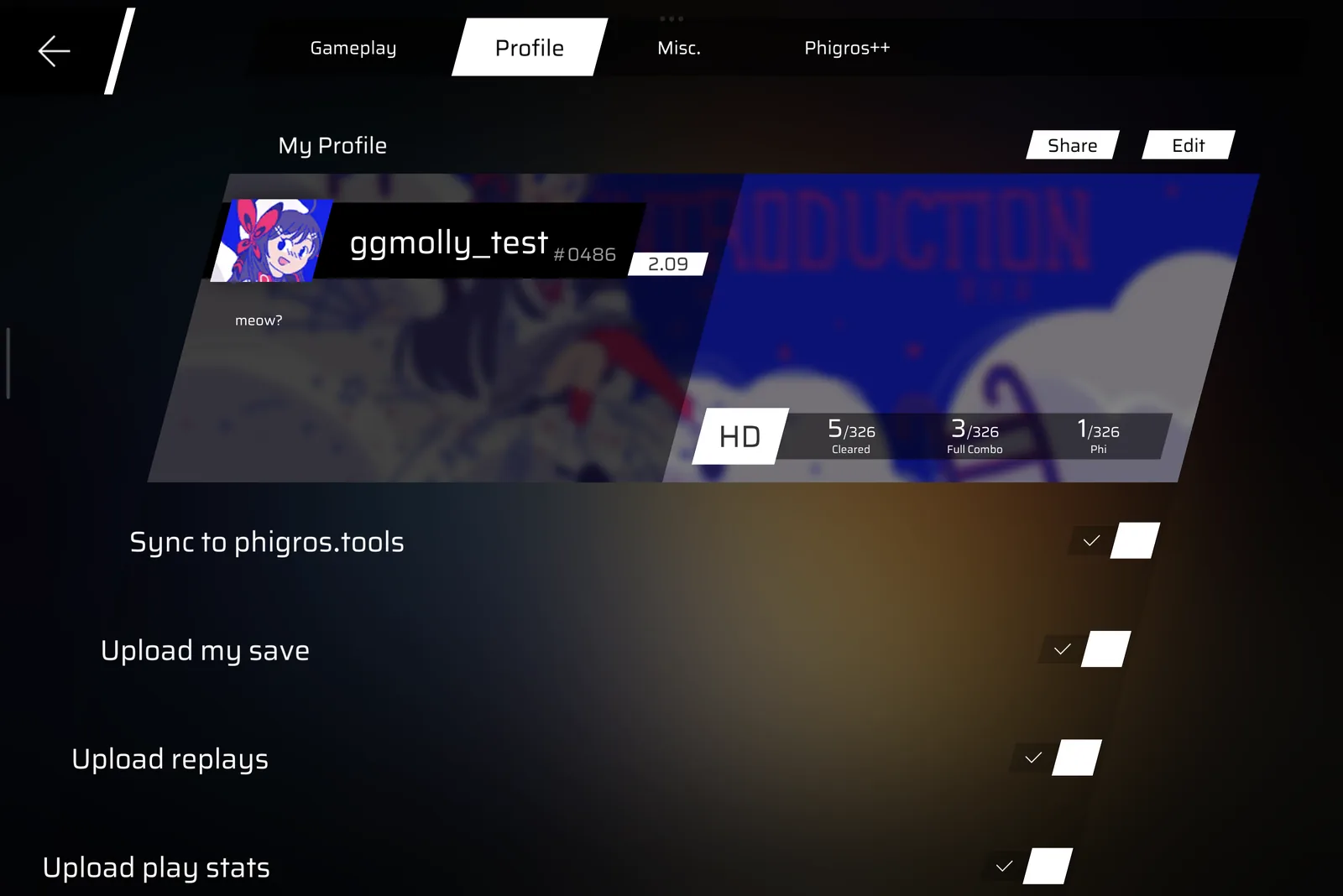
I wanted the settings for all this inside the game’s own settings screen, looking like the rest of it. So Phigros++ clones the game’s own UI: it adds a “Phigros++” tab next to Gameplay, Profile and Misc., and fills it with copies of the game’s own toggles, sliders and buttons. Icons are drawn from signed distance fields in Lua, so the mod ships zero images.
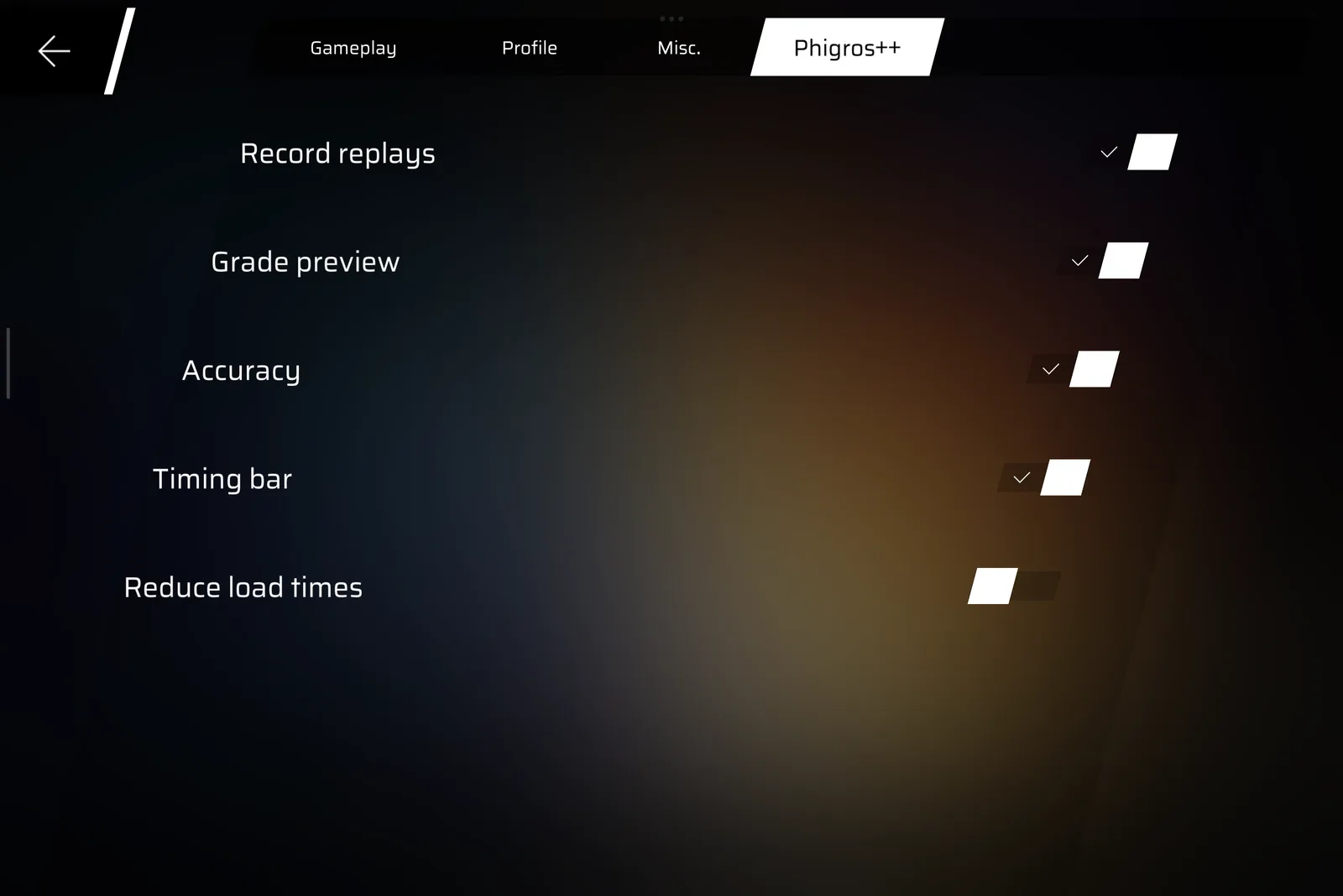
That same night I wrote down a second rule: never touch the player’s save. If a mod eats your save once, you don’t install it again.
Why are the loading screens so slow?
Phigros’ loading screens always felt long to me. So I disassembled Loading.OnGUI and its two coroutines, expecting to find slow loading work. Most of it turned out to be waiting:
- a random song cover is shown, then
WaitForSeconds(0.9 + random(0.6))before loading even starts, - the scene loads in about 110 ms,
- the screen then holds until a timer reaches 1 s,
- and the exit animation runs until a counter passes 0.67 s.
Even with an instant load, that’s 2.6 to 3.2 seconds per loading screen. Tapping Play on a song was worse. A live trace of the coroutine showed a WaitForSeconds(4.0) for the start animation, a WaitForSeconds(1.0) for its fade-out, and the Level scene starting to load about 5.1 s after the tap. The trace itself printed 4,765 ms, because its clock restarted 0.3 s in, when the game called NormalStart a second time.
These are C# coroutines compiled by IL2CPP, so each one is a small class with a MoveNext method and a <>2__current field holding what it’s waiting on. An after hook on MoveNext can swap a WaitForSeconds for nil, and a coroutine yielding nil simply resumes on the next frame. That’s the core of the Reduce load times mod:
local function skipWaits(coroutine, skipped)
  hook(il2cpp.find(coroutine)[1], "MoveNext", {
    after = function(self)
      local wait = self["<>2__current"]
      if enabled() and il2cpp.is(wait, UE.WaitForSeconds) then
        self["<>2__current"] = nil
        if skipped then skipped(self["<>4__this"]) end
      end
    end,
  })
end
The exit fades are counters rather than waits, so a before hook sets the owner’s leaveTime past 0.67 and the fade ends at once.
| Transition | Before | With the mod |
|---|---|---|
| Loading screen | 2.7-3.3 s (computed) | 1.17 s and 0.87 s (measured) |
| Play -> song | ~5.1 s (measured) | ~93 ms (measured) |
I never timed the loading screen with the mod off, so that “before” is computed from the disassembly. The two measured runs are older than the exit skip: 0.68 s of each is the exit animation, about 110 ms the scene load, and the rest slow frames (one of them 321 ms, in the 1.17 s run). Without the exit, those runs would come to 0.50 s and 0.19 s, but I haven’t timed the current version.
It took three tries to get there. Speeding the start animation up 4x worked, but it looked janky. Skipping it made the old screen pop up for a few frames, because the coroutine re-enabled the animation card right before its next wait; hiding it in the same hook fixed that. And when I also cut the 1.5-second lead-in before a song starts, the game hung on the first song I tried: the music was scheduled before its clip had loaded, and notes follow the music clock. That 1.5 s is partly real loading, so it stayed.
Mods watch the game, they don’t steer it
With hooks, a bridge and settings working, I wanted a proper SDK, with one constraint: Phigros++ shouldn’t make cheating easy. No API to slow the game down, no autoplay.
So the API hands mods plain Lua copies of game state (stats(), rks(), playing()) and leaves out everything that changes an outcome:
- the game’s speed,
- the judgement windows (readable, not writable),
- the judgement of a note, or touches injected into the game,
- the times of upcoming notes,
- writing score, records or ranking score,
- the save and unlocks,
- jumping straight to a scene.
I considered a denylist on top, refusing hooks on certain methods, but didn’t add it, since hook() can already skip or replace any method in the game, and anyone can replace the core Lua files with their own. A denylist would only be a speed bump. Fairness can’t come from the client. It has to come from a server that checks the play itself.
Replays: record the inputs, let the game judge again
Autoplay was off the table, but I wanted to watch my own plays again. The next evening I started on replays, and set myself one requirement first: make a quick and dirty proof of concept and measure the file size.
There are two ways to record a play. You can record what happened (this note was a Perfect at +12 ms), or you can record what the player did and let the game work out the rest. The second is the only one that stays exact, since the game recomputes everything the same way it did live. From the disassembly, judgement only depends on the touches, the song time and the frame time.
So recording is cheap: at the end of each frame, write down the song time, the delta time and the touches. Playback hands the recorded values back to the game in their place.
The first playback of FULi AUTO SHOOTER (HD) hit all 389 notes, and scored 994,190 instead of the 996,761 I’d played. The formula from earlier explains the gap. 996,761 on 389 notes is 385 perfects, 4 goods and a full combo:
accuracy  900000 * (385 + 0.65*4) / 389  =  896,761
combo     100000 * 389 / 389             =  100,000
total                                       996,761
Keep the same judgments, set max combo to 379, and the combo part becomes 100,000 × 379 / 389 = 97,429, for 994,190 exactly. So the playback judged every note the same way, and only max combo came out 10 short. That points at max combo bookkeeping, not judging. My best guess is when I read it: the player took the score on the frame the last note was judged and left the level at once, but the game only samples max combo in ScoreControl.Update, the same method behind a bug I found later. The next run went through the game’s real result screen, with 19 saving and unlocking steps hooked to skip and a watcher on the save file to prove nothing was written:
replay: 389/389 hits matched, score 996761, recorded 996761This is why a skip handler that throws still skips the original: if one of those 19 hooks crashed, the save step still wouldn’t run.
Seeking by fast-forwarding
A replay you can’t seek in is annoying, and the game’s judging state can’t be rewound. My idea: go back to the start and play really fast up to where you wanted to be.
That means running several recorded frames per screen frame. Unity calls each component’s Update once per frame, in an order I measured from the hooks: LevelInformation, ProgressControl, ScoreControl, FingerManagement, JudgeControl, NoteUpdateManager. For each extra recorded frame, Phigros++ calls FingerManagement, JudgeControl and NoteUpdateManager by hand in that order, then ScoreControl.
Two bugs showed up on the way. At 4x, the first notes all missed (382 of 389 hits), because JudgeControl only judges while the music’s play flag is set. At the end of a recording, the song kept going with no new notes, which needed an explicit LevelOver().
After that, the whole 132-second song replayed in 11 seconds at 16x, exact. Rewinding is reloading the Level scene and fast-forwarding to the target, at 32 recorded frames per screen frame.
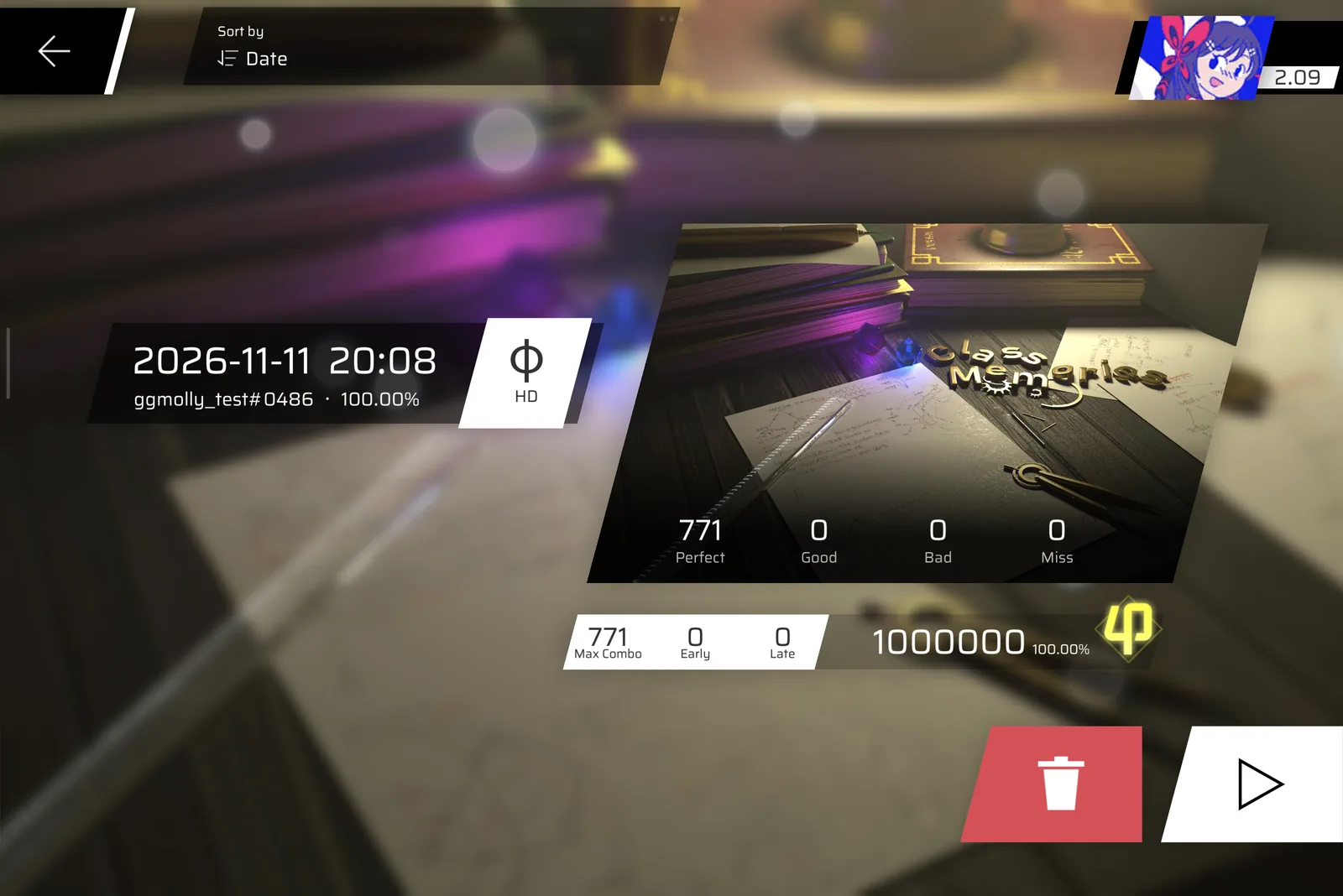
The replay codec
The first replay file was plain floats: per frame the song time, delta time and touch count, per touch an id, a phase and two coordinates. For 132.3 seconds of play (16,071 frames, 19,761 touches) that’s 342,289 bytes.
General-purpose compressors helped less than I hoped:
| What I tried | Size |
|---|---|
| Plain floats | 342,289 B |
| gzip | ~154 kB |
| zstd -19 | ~140 kB |
| xz | 107,912 B |
| Split into columns, then xz | ~88 kB |
| First prototype of a real codec | 56,687 B |
Ported to Lua, PIGEON magic | 49,729 B |
| Second pass | 45,670 B |
(The magic bytes at the start of the file say PIGEON. That was my one non-negotiable design decision.)
The codec is the same family as the chart codec, so I won’t repeat how it works. Every value is predicted, and only the difference from the prediction is stored, as the number of representable floats between the guess and the truth. Those integers go through the same adaptive range coder.
What differs is the data. A chart is smooth curves that an editor baked into straight segments. A replay is noisy clocks and fingers. So the predictors are physical:
- Delta time is about 1/120 s. The tablet runs at 120 Hz, and its frame times sit within nanoseconds of 8,333 us. Predicting the constant f32(1/120) cost 6.09 bits per frame, predicting the previous delta 7.11. The context is the previous residual, signed, because a long frame tends to follow a short one.
- Song time is the last time plus delta time, plus a correction. The game smooths its song time towards the audio clock, so only 6,290 of 16,070 frames had
t == last + dtexactly. The codec assumes the correction from the previous frame happens again, and stores how it changed. - Fingers keep their order and their speed. In 15,986 of 16,070 frames, the fingers that were still down came first, in the same order, then the new ones. One adaptive bit says “same order”. A held finger costs a “didn’t move” bit, and a moving one stores the change in its velocity.
- Touch positions sit on a grid. Every one of the 19,761 positions was an exact multiple of 1/1024 pixel, which is Unity’s grid. Looking at the remainders, they piled up at 0, 102, 205 … 922 (multiples of 102.4, rounded): the tablet’s touch panel reports tenths of a pixel, and Unity rounds those onto its own grid. About 48% of the positions were exactly on that coarser grid (raw panel samples). The others were interpolated by Android between two samples.
So a coordinate becomes a step on the panel’s 1/10 px grid, which carries the motion and gets predicted, plus a remainder on Unity’s grid, which is 0 for raw samples:
local function split(v) -- v in 1/1024 px
  local n = (v * 10 + 512) // 1024
  return n, v - (n * 1024 + 5) // 10
end
That alone saved about 2.6 kB of the 4,059 bytes the second pass took off. The rest came from the song-time correction (~0.6 kB), adapting fast at first (~0.5 kB) and the signed delta-time context (~0.4 kB).
One constant differs from the chart codec, and I measured it. The chart codec predicts 2 bits of each residual after its top bit. On the tuned prototype, predicting more gave:
| Predicted bits | Size |
|---|---|
| 1 | 50,337 B |
| 2 | 50,005 B |
| 3 | 49,861 B |
| 4 | 49,687 B |
| 6 | 49,554 B |
Chart residuals are either exact or a jump, while replay residuals are jitter spread over a few bits, so more of those bits still have a pattern. 6 saved another 133 bytes, and I stopped at 4.
The other difference is in the code. The replay codec has one function for both directions: the format is a single frames() function, and every primitive takes a value and returns one. Encoding passes the recorded values and gets them back. Decoding passes nil and gets the decoded ones. The encoder and decoder share every line, so they can’t drift apart.
At 45,670 bytes I asked myself whether there was room left. Here’s what the file was made of:
| Part | Size |
|---|---|
| Sub-grid remainder of interpolated touches | 12.3 kB |
| Finger movement | 12.2 kB |
| Delta time jitter | 12.1 kB |
| Song time | 5.2 kB |
About 80% of that is measurement noise that no model can predict. The one thing that isn’t noise is the song time, since the game computes it from the audio clock with a filter. I tried to simulate that filter bit for bit, but it rounds through values the replay doesn’t store and matched on only 57% of frames. A statistical model of it saved about 1 kB, not the 4-5 kB I’d hoped for, so I stopped at 45,670 bytes: 7.5x smaller than the plain floats, and 2.4x smaller than xz.
That number didn’t last. When replays started going to phigros.tools (next section), I added the game’s other clocks to every frame, plus the device and its settings to the header. Replays roughly doubled, to 110-117 kB for a similar length. I noted it and moved on. Today, on 10 verified replays from the public leaderboard, files are 66 to 139 kB for 2 to 3 minutes. The clocks are about 60% of each file. The touches and song time alone are 27-57 kB, right where the original 46 kB was.
Sending a replay somewhere: keys without accounts
Watching my own plays was nice, but I also wanted them on phigros.tools: a profile, a leaderboard, replays anyone can watch. That needs to know who uploaded what.
The obvious answer is accounts. I wanted none of that. No email, no password, and certainly not the player’s TapTap session token, which should never leave their device. I also decided not to verify that a key belongs to a particular Phigros player. Why would I? The site only needs to know that this upload comes from the same person as the last one.
So each player gets an Ed25519 key, made on the device the moment they turn sync on:
- 16 random bytes from the kernel,
- a SHA-512 hash,
SHA-512("phigros++ identity" || bytes), keeping the first 32 bytes as the seed, - an Ed25519 key pair from that seed, using TweetNaCl, vendored in C.
The 16 bytes are shown as 16 words, one per byte, from a 256-word list where every word’s first four letters are unique. Restoring only reads those four letters, so a typo after them doesn’t matter. That’s 128 bits, the same as a 12-word Bitcoin wallet phrase. The key is only kept once the player has confirmed they wrote the words down and the server has accepted it. I dropped QR codes: Phigros’ manifest doesn’t ask for the camera permission, so the game could show one but never scan one, and half of the feature would have been useless.
Names work like Discord’s old tags: your Phigros name plus a number. The number is always chosen by the server, never by the client. A player’s id is the first 12 hex characters of their public key, 48 bits. I’d started with 8, but with 8 hex characters (32 bits), the birthday problem gives a 39% chance of two players sharing an id at 65,536 players. 48 bits pushes that out of reach.
Signatures in the body
Normally a signed request carries its signature in a header. This build of Unity has no UnityWebRequest.SetRequestHeader: it was stripped out with the other parts of Unity the game doesn’t use. So the authentication goes in the body, in front of the real one:
pubkey (32) | signature (64) | time ms, i64 LE (8) | bodyThe signature covers more than what’s sent:
"phigros.tools request v1\0" .. "POST /api/replays\n"
  .. time .. body
The time is a little-endian 64-bit integer. The method and path are signed, so a signature for one endpoint can’t be reused on another. The first string is a domain, so a request signature can never pass for any other kind of signature. Instead of a nonce, the time must strictly increase for each key, and stay within a day of the server’s clock. A device whose clock once ran ahead gets a 409 with the last time the server saw, and retries once after it. Reads are POSTs too, since a GET can’t carry a signed body.
The server side is one 82-line file, with no auth library. Testing locally hit one more surprise: Unity refuses plain HTTP connections (loud sigh), so I tested through a tunnel. Late the following morning, the first real personal best went up: Bluewind (PRAW), HD, 922,496, 19,402 frames, 125,783 bytes, on the server about 0.3 s after the game saved it.
Only plays that beat or tie your record are uploaded. Every play is still saved on the device.
Logging in on the website works the same way as on the phone, with keys and no passwords. The browser makes its own non-extractable Ed25519 key with Web Crypto. A device that’s already signed in shows an 8-character code (32 symbols, no 0/1/I/O, though I could have kept them since the font tells those characters apart well enough, valid for 10 minutes, usable once), and the new one types it in. Only public keys ever reach the server, and removing a device from the list is enough to sign it out.
Proving a score: porting the game’s judgement bit for bit
phigros.tools had a replay viewer by then, drawing the notes and the recorded fingers in the browser. Looking at it, I had a nagging feeling: the taps didn’t look like the ones in the game, and every replay looked like a Phi. Was it really showing what happened?
It wasn’t. The viewer drew hits from the chart, not from the touches. To show what really happened, it had to judge the touches the way the game does. And if a browser can do that, so can a server, which then gets a result it computed on its own from the touches, instead of trusting the number the game reported.
The idea comes from Trackmania Nations Forever, the one I played (the rest of the series probably works the same way): a record comes with its replay, and the replay is what proves the time.
So I ported the game’s judgement. I disassembled FingerManagement, JudgeControl, the four note classes and ScoreControl, then wrote a TypeScript port of 630 lines. It has to agree with the game on every frame, so it follows the same discipline as the chart decoder from the last post, one level stricter:
- The game computes in single precision. JavaScript computes in doubles. So every operation goes through
Math.fround, which rounds to the nearest f32, after each step, in the game’s order. - Constants are the game’s f32 values, written out: the windows are
0.07999999821186066,0.18000000715255737and0.2199999988079071seconds, not 0.08, 0.18 and 0.22. - When several notes tie, the game judges them in the order .NET’s sort leaves them. That sort is an unstable introsort, so the port reimplements it.
The first run against Bluewind matched the game exactly:
recorded  922496  P 555  G 11  B 0  M 9  combo 245  E 2  L 9
replayed  922496  P 555  G 11  B 0  M 9  combo 245  E 2  L 9
The spec also turned up a bug in the replay player: fast-forwarding skipped ScoreControl.Update, where the game samples max combo, so above 1x a replay could show a lower max combo than recorded. My test song hadn’t hit it.
The worker
The same judge.ts runs in two places: the browser’s replay viewer, and a worker on the server. An upload is stored as a file plus a row with status pending in SQLite, and announced on a RabbitMQ queue.
The worker takes one message at a time. It decodes the .pigeon replay, decodes the chart’s .phc file with the chart codec, judges, and compares 8 numbers: score, max combo, perfect, good, bad, miss, early and late.
const judged = judge(decodePhc(chartBytes), frames, header);
const same = RESULT.every((f) => header[f] === judged[f]);
settle.run(same ? "verified" : "unverified", ...);
If all 8 match, the replay is verified and can raise the player’s best and ranking score. If any differs, it’s unverified, and both results are stored. A replay from a game version the site has no charts for stays pending. SQLite is the source of truth and the queue is only a doorbell: on start, the worker sweeps every row still pending, and if it loses the broker, it exits and Docker restarts it.
judge.ts the browser viewer uses, and only a replay whose 8 result numbers all match the recorded ones counts.To check the “unverified” path, I took one of my own replays, raised the recorded score by 5,000, and uploaded it. The worker marked it unverified and stored both results: recorded 950,615, replayed 945,615.
Here’s what verified means, and doesn’t: these touches, judged by the game’s rules, give this result. It doesn’t mean a human played. Touches can come from anywhere, so a verified replay is one whose numbers add up, which isn’t proof that a person played it. The replay also records the game’s clocks and the device it was played on. On the site, I kept the explanation short: a tooltip saying “We checked this play and it holds up.”
The leaderboard counts verified replays and records imported from a player’s save, which show up as “Imported”. A switch shows the verified ones only. A verified replay replaces an imported record of the same score, which is why plays that only tie a record are uploaded too.
The cloud goes away
Two and a half hours later, phigros.tools showed this when importing a save:
HTTP 400 {"code":1,"error":"The app is disabled for violation
of user agreement."}
A notice from Pigeon Games explained it: Cloud Save on the Tapio (TapTap’s international store) and Google Play builds was discontinued from October 31 onwards. I guess this was it then.
Phigros.tools had been built on that cloud: you logged in, it downloaded your save. The sync work wasn’t a reaction to this, since I’d planned it the night before, but it turned Phigros++ into the only way in for global players. (TapTap login itself still worked inside Phigros++ that evening. Only the cloud save was gone.)
So Phigros++ uploads the save itself. It doesn’t parse or rewrite anything: it calls the game’s own CloudSaveManager.SaveToFolder, which writes the five encrypted modules the cloud used to receive, and zips them. To restore, it calls CloudSaveManager.LoadFromFolder and quits the game. That’s the one exception to “never touch the save”, with a rule attached: only after telling the player exactly what it’s about to overwrite. That night I restored my own save from the backup I’d made on day one, before the first repack, and it worked.
The next day, restore nearly cost me that save. Restoring a profile on a fresh device ended with a forced sync, which uploaded the fresh device’s empty save over mine on the server: 4,752 bytes became 877. I’d made a backup less than an hour earlier, so nothing was lost. The fix was a marker file: after a restore, the device never uploads its save until the player answers “Bring your save over?”. Once I’d answered it myself, I was ggmolly again (phew).
Shipping a mod of a 2.8 GB game
Lua updates without an app update
An app update means reinstalling the game. A Lua change shouldn’t. So the Lua files ship as one text bundle: a header line phigros++ <native> <version> <games...>, then each file as its path, size and bytes. A copy is compiled into the native library (about 200 KB of it), and newer bundles are downloaded from GitHub releases with a 64-byte Ed25519 signature in front: 199,905 bytes become 199,969.
A downloaded bundle is only accepted if its signature checks out against the key built into the library, its native version equals the library’s, the installed game version is in its list, and it’s newer than the one running. The header line is published on its own as a 33-byte version file, so checking for an update costs 33 bytes. Versions become numbers so that a beta sorts before its release:
1.2.3         ->  1002003999
1.2.3-beta.4  ->  1002003004
The first version updated silently in the background, and I didn’t like that at all. Now a popup offers the update, only on the chapter screen or in settings, never mid-song, with a progress bar. UnityWebRequest.downloadProgress is stripped too, so progress comes from the downloaded bytes and the Content-Length. Then Lua reloads in place.
Releases are signed offline, and the first public beta shipped with a new key.
Its own app
I wanted Phigros++ to live next to the Play Store game rather than replace it, so it became its own package, sh.molly.phigrosplusplus, labelled “Phigros++”. Nothing else changed: TapTap login still works in it.
That rename looked done until I did a clean install to check, and the game crashed at launch. Unity looks up its strings with getIdentifier(name, type, getPackageName()), which only searches the resource table of the package with that name, and resources.arsc still said com.PigeonGames.Phigros. What kind of check is that? Renaming the package inside the resource table fixed it.
Then I looked at the size
Shipping Phigros++ as an APK would have meant shipping the game: about 2.8 GB of split APKs, almost all of it Pigeon Games’ assets. The streaming asset pack alone is 1,969,650,662 bytes, 178 MB under GitHub’s 2 GiB limit per file. And re-hosting the whole game on every release is the kind of thing that gets a repository taken down, Lua update channel included.
That night I tried an APK patcher in Python, then started on an installer app, then gave up with “nah it’s getting annoying”, and went back to building it locally.
The installer
The next morning, my friend Maren told me about ReVanced Manager: an app that patches an app already installed on your phone. That’s the right idea. But ReVanced patches one APK, and Phigros is four splits. It’s built for editing Java code, and what I needed was a native library and a few resource edits. So I wrote my own, and v0.1.1 was out about three hours after the idea.
The Phigros++ Installer is plain Java 8: 10 files, 1,587 lines, no Gradle, no AndroidX. The APK is 275,111 bytes, and about 86% of that is a fallback copy of libphigrospp.so.
It reads the four installed splits straight from the Play Store install (sourceDir and splitSourceDirs, which needs neither root nor storage permission), rewrites them entry by entry, and streams the result into a PackageInstaller session. The patched game never exists on disk. Per entry, it:
- drops the old signature files,
- renames the package in the manifest’s string pool, the content provider authorities and
resources.arsc, and sets the label, - draws a ”++” badge on the 12 launcher icons,
- adds the
DT_NEEDEDtolibmain.so, and addslibphigrospp.so, - copies everything else, still compressed.
That last point is why it’s fast: the asset packs, about 98% of the bytes, are copied without being decompressed. On my desktop, packing the 2 GB split takes about 5 seconds. On a OnePlus Nord, it feels like a dozen.
The first clean install through it found one more restore bug: a fresh install never created the phigros++/ folder, which my development setup always had. Every write into it failed quietly, so a restore did nothing, a second try said I was already ggmolly#4141, and a restart forgot me.
Android checks an APK’s signature before installing it, so the installer signs too. It has its own APK Signature Scheme v2 signer: an RSA-2048 key generated on the phone, a self-signed certificate written byte by byte (no certificate library, because it’s funny to have one written by hand), and the APK’s hashes computed as it streams through, 1 MB chunk by chunk. It also checks the release’s Ed25519 signature, on BigInteger, because Android only has Ed25519 built in from Android 13 and the installer supports Android 7.
The 15-byte ELF edit
LIEF is a C++ and Python library, so the installer has its own DT_NEEDED patcher: Elf.java, 111 lines.
Adding a library name to an ELF file is harder than it sounds. An ELF file is described twice: segments tell the loader which bytes to map into memory, and sections name the parts (.dynamic, .dynstr, code…) for tools like debuggers. The list of needed libraries lives in the .dynamic section, the names in .dynstr, and both sit inside a loaded segment, with other data and code packed right after them. Making them bigger in place means moving everything behind them, and every address in the code that points past them. That’s what LIEF does, and its output is 19,104 bytes.
Elf.java doesn’t move anything. It appends a new read-only segment to the end of the file with grown copies of the three things that need to grow: the program header table (one more entry, for the new segment itself), .dynamic (one more DT_NEEDED) and .dynstr (one more name). Then it points the old file at the copies. The result is 7,973 bytes, 6,728 original plus 1,245 appended, and only 15 bytes of the original change:
e_phoff(2 bytes): where the program headers are,e_phnum(1 byte): how many there are,- the address, offset and size of the
.dynamicand.dynstrsection headers (6 bytes each).
The section headers were the surprising part. Section headers are usually only for tools, since the loader works from segments. But Android’s linker reads the list of needed libraries through the section headers before it loads anything, so without those 12 bytes, the new dependency is silently ignored.
Five betas in eleven hours
v0.1.0-beta.1 had gone out an hour and a half before the Installer. There are three ways to update now:
| What changed | How it reaches the player |
|---|---|
| Lua only | the in-game popup, then a hot reload |
| The native library, or a new game version | the Installer |
| The Installer itself | a line in the Installer, “Installer X is available” |
The Installer checks for its own updates with the Location header of GitHub’s /releases/latest redirect, so it doesn’t even need GitHub’s API.
The first time I tapped “Update” in the game’s popup, for beta.2, it simply worked, and it still surprised me. The library installed with beta.1 already trusted the new key, the native version matched, and the beta-aware numbering put beta.2 after beta.1. Beta.5 followed eleven hours after beta.1, just past midnight.
Watching someone else’s replay
That same evening, while the betas were still going out, I wanted to watch other players’ replays from inside the game. The first one I tried was my friend Maren’s, played on a phone with a 20:9 screen. My tablet is 3:2.
The first thing I noticed was that it lagged badly. My first guess was the new hooks on Screen.width and height, sending UI calls into Lua. Counting them killed that idea: about 240 calls per second during a song. A frame-rate probe found the real cause: 60 to 61 fps on a 120 Hz tablet. MIUI drops the panel to 60 Hz when nobody touches the screen, which is always the case while watching a replay, and playback was stepping one recorded frame per screen frame. A 120 Hz recording played at half speed.
The first fix was to follow real time, running several recorded frames per screen frame when needed. The second was to ask for the refresh rate the replay was recorded at. Unity’s Screen.SetResolution(..., 120) did nothing. Android’s Surface.setFrameRate did, called on Unity’s surface through raw JNI (Unity’s AndroidJNI), since the bridge can’t call generic methods.
I did wonder whether the capture format should change instead, but it shouldn’t: the game judges once per frame, using the positions of the lines, notes and fingers in that frame. A recording has to be a list of frames to stay exact, so the fix belongs in playback.
The wrong score
The replay then played smoothly, and it came out with the wrong result: thousands of points short, with misses the original didn’t have.
My first theory was the catch-up frames, the extra recorded frames run per screen frame to keep up. I was wrong. A probe showed LevelInformation.scale at 0.8427 on the tablet. That’s how far notes spread across the screen, the tablet’s aspect squeezed against 16:9 (1.498 / 1.778), and it’s 1.0 for the phone’s aspect. Faking scale directly changed nothing, though.
So I took the question out of the game. The web judge can lay a chart out for any screen, so I ran the replay through it twice, with the phone’s layout and with the tablet’s layout and the touches remapped. The tablet version reproduced the game’s wrong numbers exactly, so the difference came from the layout, and timing was fine.
The culprit was a cache. LevelControl.<Start>, the coroutine that lays out a chart, reads the screen size from GameInformation.screenW and screenH, which the game stores once at launch, not from Screen. Phigros++ now swaps them for the replay’s values while that coroutine runs, fakes Screen.width, height and dpi while lines and notes are created, and remaps the touches by aspect. Less than an hour after I started on it, the log said:
replay: same result as recordedAt 16x, the 128-second song was judged in 14 seconds.
I wanted marks on the seek bar, so you can jump straight to where the player missed a note, or hit it too early or too late. For those marks to be there from the start, a replay is now judged before it plays: a silent pass at 256 recorded frames per screen frame with every camera off, under a “Preparing…” cover. It takes about 5 seconds for a 128-second chart. Beta.5 shipped forty minutes later with the top 50 of each chart watchable in game, 3 days, 6 hours and 40 minutes after my first message, and I updated the tablet through the popup like anyone else would.
Loose ends
- Verified isn’t human. Re-judging proves the touches and the result agree, nothing more.
- Mirror and challenge mode replays are supported by the format and the judge, and untested, because I haven’t unlocked them.
- Cross-device replays were tested on one chart, from one other device.
- Seeking backwards goes through restart and fast-forward. I’ve tested 16x end to end, but not a direct jump back.
- 60 fps devices pay about 18 bits per frame for delta time, against 6-7 at 120 Hz, because the predictor is the constant 1/120 s. A per-replay frame period would fix that. Same for the audio clock’s steps, which could be nearly free.
- Uninstalling the Installer loses its signing key, so the next update hits a signature conflict.
If you have an arm64 Android device and Phigros from the Play Store, the Installer turns it into Phigros++ on the phone itself. Turn on “Sync to phigros.tools” under Settings -> Profile and beat (or tie) one of your records: the replay reaches the server well under a second later, and shows up on the leaderboard once the worker has re-judged it. The code is on GitHub.
What a journey, huh? (a lot of new features are coming soon!)